CORS#
Vapor by default provides a middleware for implementing proper support for Cross-Origin Resource Sharing (CORS) named CORSMiddleware.
“Cross-Origin Resource Sharing (CORS) is a specification that enables truly open access across domain-boundaries. If you serve public content, please consider using CORS to open it up for universal JavaScript / browser access.” - http://enable-cors.org/
To learn more about middlewares, please visit the Middleware section of the documentation here.
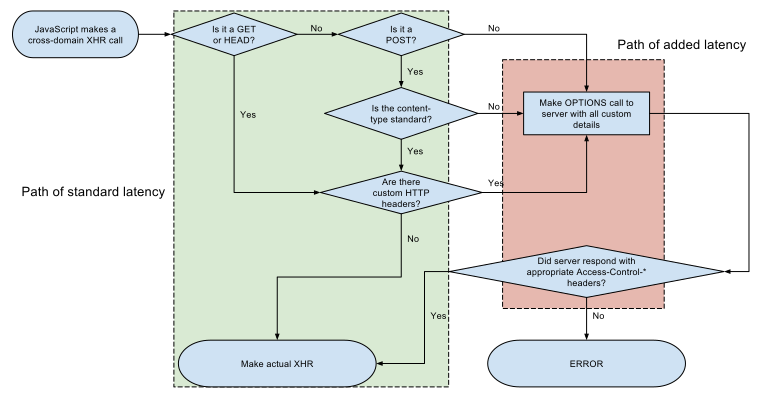 Image Author: Wikipedia

Basic#
First of all, add the CORS middleware into your droplet middlewares array.
Config/droplet.json
{
    ...,
    "middleware": [
        ...,
        "cors",
        ...,
    ],
    ...,
}
Next time you boot your application, you will be prompted to add a Config/cors.json file.
Config/cors.json
{
    "allowedOrigin": "*",
    "allowedMethods": ["GET", "POST", "PUT", "OPTIONS", "DELETE", "PATCH"],
    "allowedHeaders": [
       "Accept",
       "Authorization",
       "Content-Type",
       "Origin",
       "X-Requested-With"
    ]
}
Note: Make sure you insert CORS middleware before any other throwing middlewares, like the AbortMiddleware or similar. Otherwise the proper headers might not be added to the response.
CORSMiddleware has a default configuration which should suit most users, with values as follows:
Allowed Origin
Value of origin header in the request.
Allowed Methods
GET,POST,PUT,OPTIONS,DELETE,PATCH
Allowed Headers
Accept,Authorization,Content-Type,Origin,X-Requested-With
Advanced#
All settings and presets can be customized by advanced users. There’s two ways of doing this, either you programatically create and configure a CORSConfiguration object or you can put your configuration into a Vapor’s JSON config file.
See below for how to set up both and what are the options.
Configuration#
The CORSConfiguration struct is used to configure the CORSMiddleware. You can instanitate one like this:
let config = try Config()
config.addConfigurable(middleware: { config in
	return CORSConfiguration(
		allowedOrigin: .custom("https://vapor.codes"),
		allowedMethods: [.get, .post, .options],
		allowedHeaders: ["Accept", "Authorization"],
		allowCredentials: false,
		cacheExpiration: 600,
		exposedHeaders: ["Cache-Control", "Content-Language"]
	)
}, name: "custom-cors")
Then set the custom-cors in your Droplet’s middleware array.
Config/droplet.json
{
    ...,
    "middleware": [
        ...,
        "custom-cors",
        ...,
    ],
    ...,
}
Note: Please consult the documentation in the source code of the
CORSConfigurationfor more information about available values for the settings.